

AI that does real work for your business.
We design AI workflows around the way your team actually works — connected to your tools, supervised where it matters, and focused on outcomes you can measure. No abstractions, no science projects.
AI workflows are where AI stops talking and starts working.
An AI workflow is what people mean when they say "agentic AI" or "agents" — a purpose-built process that puts AI to work on a specific business job, from start to finish.
AI takes on the repetitive and routine. Your team gets to focus on the high-value work that actually needs them.
From assistant to operator
For a while, AI has been something you talk to — a drafting aid, a search interface, a conversation partner. AI workflows are the next step: AI running specific work from start to finish, without needing to be prompted at every step. The models themselves aren't the story anymore. Putting them to work is.
It's never just one AI
A workflow is usually many AI models working in combination. Different steps call for different strengths — reasoning-heavy analysis, quick classification, image or audio understanding, tone-matched writing. The craft of design is choosing the right model for each step, and building so you can swap them as better ones arrive.
Smaller tasks, reliable outcomes
AI is unreliable when asked to do everything in one shot. Workflows are reliable because they break the work into smaller, focused tasks — each with a clear input, a clear output, a narrow job. What looks like one complex workflow is really a chain of targeted steps, each small enough for AI to nail.
Human in the loop — no surprises
AI does the work; your team approves the output. That's what "human in the loop" means in practice — you design where the checkpoints go, so the finished product always matches expectations. The AI does the lifting; you stay in control of what ships.
See it in action.
The blog you're reading right now is produced by an AI workflow we built for ourselves. A video gets transcribed, an agent does the research, drafts the post, generates the cover image and audio, runs it past a human editor, and ships it to production. Click through to explore the diagram.
From a video to a published blog — automatically.
Thirteen connected steps. One human checkpoint. A real, working pipeline that publishes the content on this site every week.
Stylized preview — click to open the live diagram
What AI workflows look like in practice.
Examples drawn from across different parts of the business. Each one is shaped to its specific work.
Targeted sales follow-up
Inbound leads get researched against public sources, matched with the most relevant material from your business — case studies, capabilities, references — and a tailored follow-up email gets drafted with content geared to what each lead is likely to care about. Ready for the sales team to review and send.
Faster customer service
Customer questions get answered faster. The straightforward ones get answered right away from your knowledge base; the trickier ones get routed to the right person with a suggested answer already prepared. Less waiting, more accuracy, better service across the board.
Content production pipelines
Source material in (video, transcript, brief), polished content out (blog, social, audio, imagery) — with a human editor's stamp on each piece before it ships.
Pattern shown in the live example above.
Automated report generation
Pull inputs from your systems, summarize what matters, drop it into the right template, and produce a finished document — ready for review. Quarterly business reviews, project status updates, compliance summaries: structured documents that used to be assembled by hand.
Internal knowledge agent
Your team asks a question in plain English and gets a clear answer pulled from your internal documents — policy library, onboarding guide, training material, FAQs — with citations back to the source. Knowledge that used to live scattered across files becomes something anyone can ask.
Customer feedback, in your systems
Customer feedback — reviews, surveys, support tickets, sales call notes — gets read, classified, and pushed into the systems your team already uses: feedback platforms, the CRM, customer records. What used to be raw text becomes structured signal that your tools can act on.
The workflow that matters most to your business will usually be one designed for the specific work your team does.
How we build them.
A four-stage engagement designed to find the highest-value workflow first, ship it cleanly, and keep it healthy after launch.
Discover
A short workflow audit — we map where time is going, identify the highest-ROI candidates, and size the impact before we commit to building anything.
Design
We design the workflow on paper first — steps, integrations, prompts, human checkpoints, failure modes. Cheap to change here. Expensive once it's built.
Build
We assemble it in your stack of choice — n8n, custom code, the Claude or OpenAI APIs — connected to your real tools, with logging and guardrails wired in from day one.
Operate
Models change, prompts drift, edge cases surface. We stay on for governance, observability, and iteration — or we hand it cleanly to your team with the runbook.
An AI stack is a series of choices, not a shopping list.
Anyone telling you there's a single best AI stack is selling something. What ends up in yours depends on what the workflow has to do, the systems it has to live in, and what you care most about — speed, cost, control, simplicity. Each layer is a trade-off worth making consciously.
Orchestration choices
How a workflow is wired is a separate question from what it does. The work decides which way to lean.
Model choices
Different steps want different models. The landscape changes every few months — design for swap-ability, not lock-in.
Where open-source fits
Self-hosting open-weight models has clear wins and clear costs. Weigh per workflow, not as a blanket policy.
- data is sensitive
- latency is tight
- volume is high
- no API to call
- most workflows
- iteration is the priority
- quality leader is hosted
- low ops overhead
Around the team and systems
A workflow that's clean on paper but ignores the systems your team already lives in won't get used. Design with the existing stack, not against it.
An AI workflow is more than the workflow.
Around every production AI workflow is a runtime layer that handles identity, secrets, governance, cost controls, observability, storage, and isolation. The workflow does the work. The runtime is what makes that work safe to run.
Without it, you have a script that calls AI. With it, you have a system that handles real data, real customers, and real consequences responsibly.
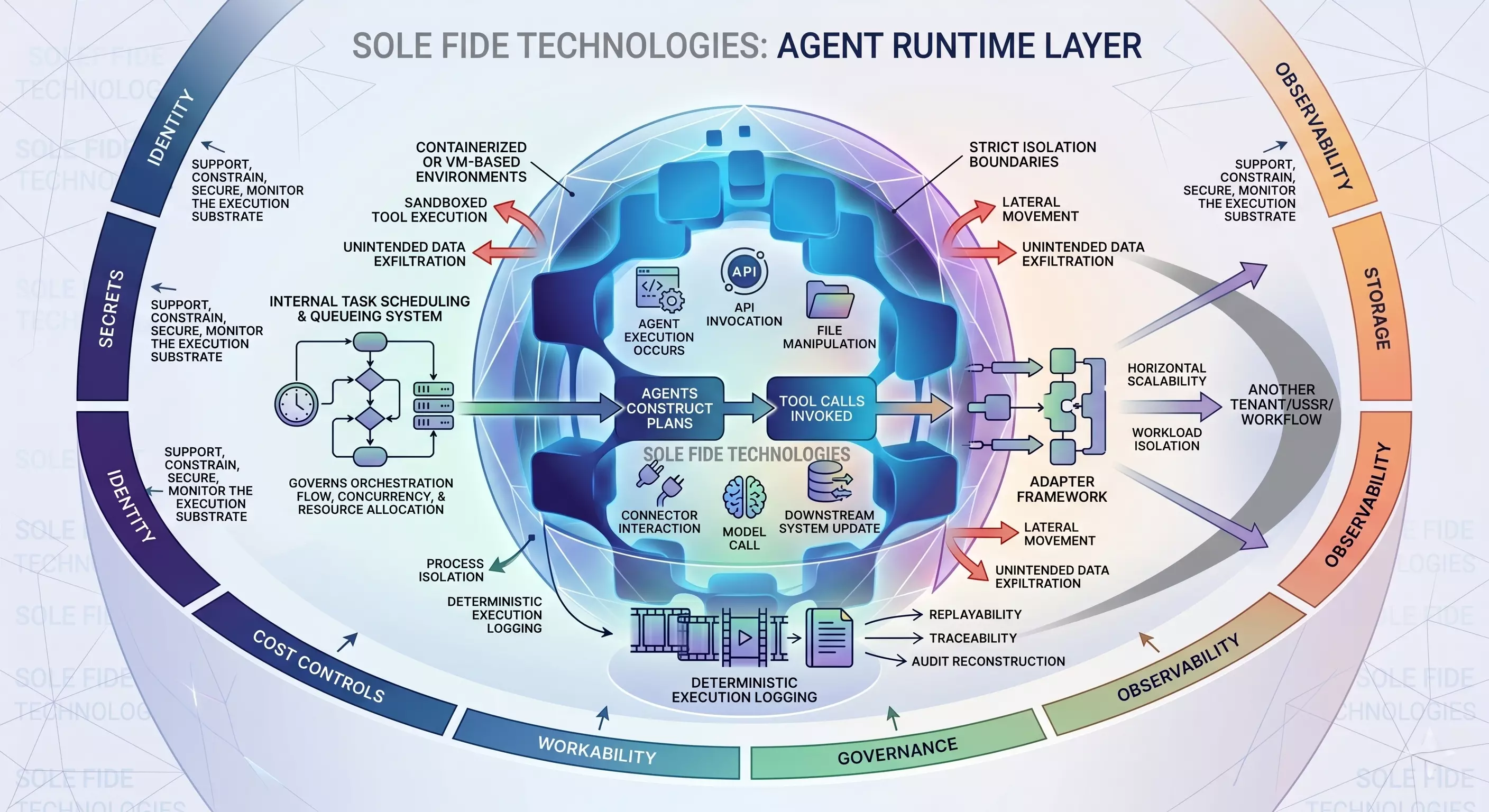
Identity
Every action a workflow takes is tied back to a known agent, user, or service. When you audit what happened, you know exactly who or what was behind it. No anonymous actions, no ambiguous accountability.
Secrets
API keys, credentials, and tokens stay in vaults. They're injected into the workflow at runtime when needed and never persist into prompts, logs, or stored output. The workflow gets what it needs to act, when it needs to act, and nothing more.
Governance
Policies define what each workflow is allowed to do — which systems it can touch, which data it can see, which actions need a person to approve. The boundaries are explicit and enforced, not assumed.
Cost controls
Every run has a budget. Spend caps, model-tier policies, and alerts keep token costs predictable instead of being a surprise at the end of the month.
Observability
Every step is logged. Every model call is traceable. Every output is replayable. When something needs investigation — for debugging, compliance, or audit — the trail is already there.
Storage and isolation
Data lands where it should — with the right durability, the right retention, the right tenancy. Workflows can't reach into each other's data, and one tenant can't see another's anything.
Have something in mind?
Tell us what you're hoping to accomplish and we'll talk through whether an AI workflow fits.
Start a Conversation