

The AI landscape has fundamentally shifted. What once required expensive cloud subscriptions and the implicit surrender of your data to third parties can now run entirely on the hardware sitting under your desk. Running large language models locally isn’t just a technical curiosity—it’s a strategic decision about data sovereignty, latency, and operational costs.
If you’ve been curious about breaking free from API dependencies and running AI on your own terms, this guide will walk you through everything you need to know: the hardware that actually matters, the platforms that make it accessible, the model formats you’ll encounter, and the key concepts that will help you navigate this rapidly evolving space.
Why Local? The Case for AI Sovereignty
Before diving into the technical details, let’s address the fundamental question: why bother running models locally when cloud APIs are so convenient?
Privacy and Compliance. When you send a prompt to a cloud API, that data leaves your control. For organizations handling sensitive information—medical records, proprietary code, legal documents—this creates compliance headaches and security risks. Local execution means your prompts and responses never leave your physical infrastructure. For industries governed by regulations like HIPAA or CMMC, this isn’t a nice-to-have; it’s often a requirement.
Latency. Cloud-based inference typically introduces 200-500 milliseconds of round-trip latency. That might seem trivial until you’re building a coding assistant that needs to feel responsive, or a real-time application where delays compound. Local deployment eliminates network overhead entirely.
Cost Control. API pricing adds up quickly, especially for high-volume applications. Once you’ve invested in capable hardware, inference is effectively free. No per-token billing, no surprise invoices, no rate limiting during critical workloads.
The Open-Weight Revolution. Models like Meta’s Llama 4, Alibaba’s Qwen 3, and DeepSeek V3 now offer reasoning capabilities that rival proprietary systems—and they’re available for local deployment. The performance gap between “cloud-only” and “runs on your hardware” has narrowed dramatically.
Hardware: Memory Bandwidth is King
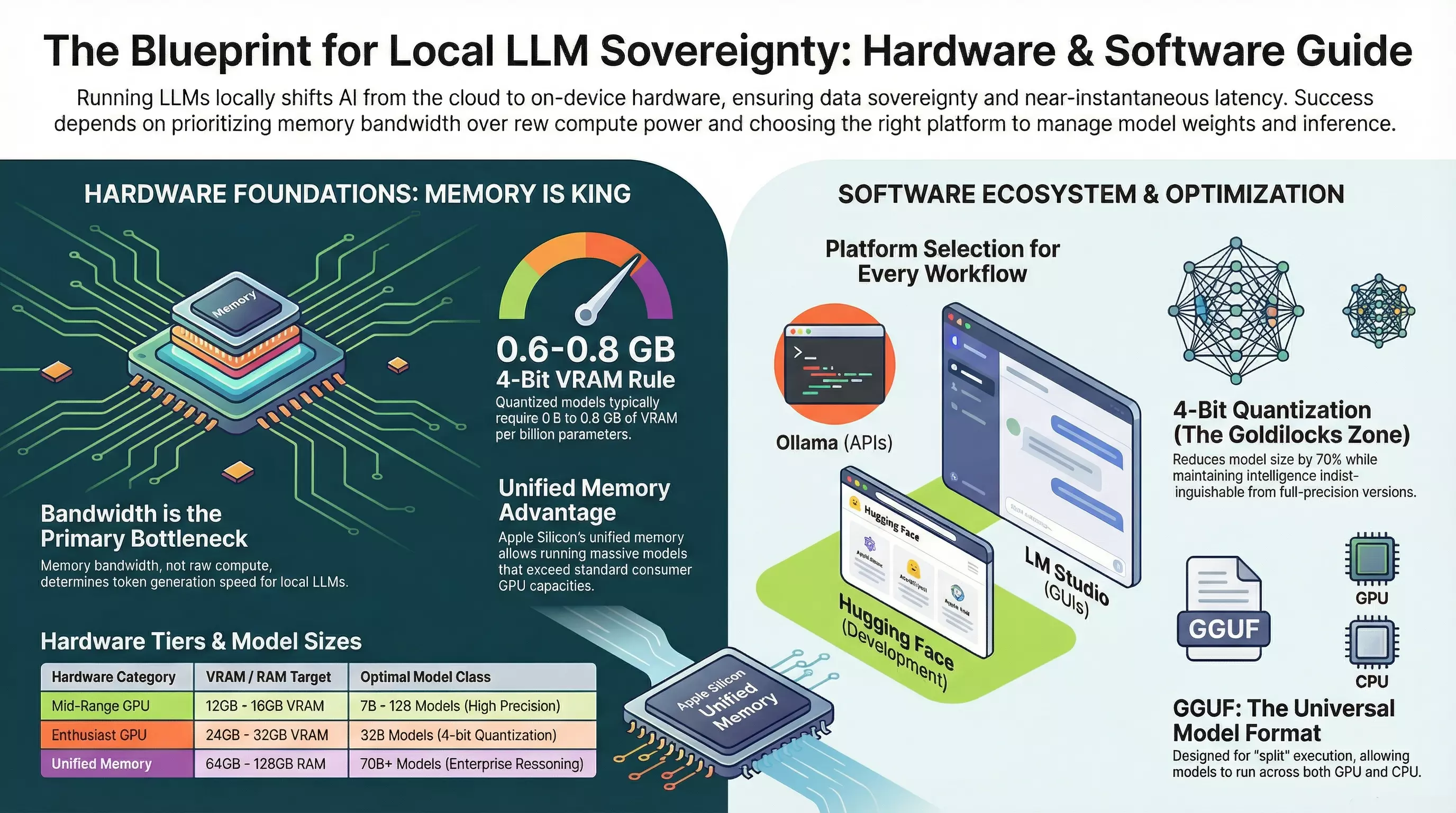
Here’s the counterintuitive truth that trips up most newcomers: raw compute power (FLOPS) isn’t the bottleneck for local LLM inference. Memory bandwidth is.
During token generation, the transformer architecture must fetch every weight parameter from memory for each token it produces. A processor with enormous computational throughput will sit idle if the memory bus can’t deliver data fast enough. This is why hardware with high-bandwidth memory consistently outperforms newer processors with lower memory throughput.
The Practical Hardware Tiers
| Hardware Category | VRAM/RAM Target | What You Can Run |
|---|---|---|
| Budget/Laptop | 8-16GB RAM (CPU only) | 7B models at 4-bit quantization, ~2-5 tokens/sec |
| Mid-Range GPU | 12-16GB VRAM | 7B-12B models comfortably, some 32B models at aggressive quantization |
| Enthusiast GPU (RTX 4090) | 24GB VRAM | 32B models at 4-bit, 14B at higher precision |
| Unified Memory (Apple Silicon) | 64-128GB | 70B+ models, with the tradeoff of lower bandwidth (~15-30 t/s) |
The key metric to remember: 4-bit quantized models require approximately 0.6-0.8 GB of VRAM per billion parameters. A 7B model at 4-bit needs roughly 5GB of VRAM. A 70B model needs 40-50GB.
Memory Capacity vs. Speed
Capacity determines whether you can run a model. Bandwidth determines how fast it runs. You also need to budget for the KV cache—a dynamic memory buffer that grows with conversation length. In long-context scenarios (32K+ tokens), the KV cache alone can consume several gigabytes, potentially pushing you into out-of-memory territory or forcing spillover to slower system RAM.
Platform Selection: Three Paths to Local AI
The platform you choose shapes your entire experience. Each has distinct strengths:
Ollama: The Developer’s Gateway
Ollama has become the default choice for developers who want local models as a drop-in replacement for cloud APIs. It runs as a background service, exposes an OpenAI-compatible API at http://localhost:11434/v1/, and handles the complexity of GPU acceleration automatically.
Strengths:
- Single command to download and run models:
ollama run llama3.1 - OpenAI-compatible API means existing code often works with minimal changes
- Handles NVIDIA, AMD, and Apple Silicon without manual driver configuration
- Modelfile system for customization (system prompts, parameters, adapters)
Best for: Developers building applications, automation workflows, anyone who needs a reliable local API endpoint.
LM Studio: The Polished Desktop Experience
LM Studio provides a visual interface that mimics ChatGPT while running entirely offline. It includes an integrated browser for the Hugging Face Hub with real-time VRAM estimates, making model selection intuitive.
Strengths:
- Visual controls for every inference parameter
- Built-in model discovery with hardware compatibility indicators
- Supports offline operation after initial model downloads
- Headless server mode for background use
Best for: Non-developers, analysts, anyone who wants a clean UI for experimentation without command-line interaction.
Hugging Face Ecosystem: Maximum Flexibility
Hugging Face isn’t a single platform—it’s the ecosystem backbone. The Hub hosts models, the transformers library runs them, and various tools handle downloading, caching, and offline operation. This path offers the most control but requires more engineering decisions.
Strengths:
- Access to virtually every open model released
- Full control over inference pipeline
- Extensive quantization options
- First-class offline support via
HF_HUB_OFFLINE=1
Best for: Researchers, teams with specific requirements, anyone building custom pipelines or fine-tuning models.
Model Formats: GGUF, SafeTensors, and Quantization
One of the most confusing aspects of local LLMs is the alphabet soup of file formats. Here’s what you actually need to know:
GGUF: The Universal Format
GGUF (GPT-Generated Unified Format) has become the dominant format for local inference. Developed by the llama.cpp team, it’s designed for versatility:
- Supports “split” execution—some layers on GPU, others on CPU
- Includes metadata (prompt templates, architecture details) in a single file
- Works across platforms and runtimes
When you see model files on Hugging Face with names like model-Q4_K_M.gguf, that’s GGUF with a specific quantization level.
SafeTensors: The Secure Alternative
SafeTensors is the modern replacement for pickle-based formats. Unlike older formats that could potentially execute arbitrary code, SafeTensors doesn’t allow code execution—significantly reducing malware risk. It’s become the standard for distributing full-precision weights.
Understanding Quantization
Quantization is the technique that makes billion-parameter models fit on consumer hardware. By reducing numerical precision from 16-bit or 32-bit floats down to 8-bit, 4-bit, or even lower, you can shrink model size by 70%+ with surprisingly little intelligence loss.
The 4-Bit Sweet Spot: Q4_K_M (a common GGUF quantization level) represents the practical balance point. Models at this precision are typically indistinguishable from full-precision versions for most tasks, while fitting in a fraction of the memory.
| Format | Best For | Key Characteristic |
|---|---|---|
| GGUF (Q4_K_M, Q5_K_M) | General use, CPU/GPU split | Versatile, widely supported |
| EXL2 | NVIDIA GPU-only inference | Highest performance when model fits entirely in VRAM |
| AWQ | Coding/reasoning tasks | Protects important weights from quantization error |
| GPTQ | Legacy systems | Older but still functional |
Trusted Quantizers on Hugging Face
Most users download pre-quantized models rather than running quantization themselves. A few community contributors have earned reputations for reliable, well-tested quants:
- Bartowski — Currently the gold standard for GGUF and EXL2
- Unsloth — Specialized in optimized, high-accuracy quants
- MaziyarPanahi — Reliable across many model families
Always check that downloaded models use the SafeTensors or GGUF format to avoid security risks from legacy pickle-based files.
Sampling Parameters: Tuning Output Quality
Once you’re running models locally, you gain fine-grained control over how they generate text. Understanding these parameters helps you optimize for different tasks.
Temperature: The Creativity Dial
Temperature controls randomness in token selection:
- Low (0.1-0.3): Deterministic, focused. Ideal for factual tasks, coding, structured outputs.
- Medium (0.5-0.7): Balanced. Good for general conversation.
- High (0.8-1.2): Creative, diverse. Better for brainstorming, creative writing, but risks incoherence.
Truncation Methods: Controlling the Probability Space
These parameters limit which tokens the model can choose from:
- Top-K: Only consider the K most likely next tokens (e.g., top_k=50)
- Top-P (Nucleus): Include tokens until cumulative probability exceeds P (e.g., top_p=0.95)
- Min-P: The current state-of-the-art—sets a minimum threshold relative to the top token’s probability, adapting naturally to model confidence
Repetition Penalties
Models sometimes fall into loops. Repetition penalty (typically 1.1-1.2) discourages repeated phrases. Go higher than 1.2 and you risk making output unnatural as the model contorts to avoid common words.
Context Windows and the KV Cache
The context window is the model’s working memory—how many tokens it can “see” at once. Modern models advertise impressive context lengths (128K tokens or more), but there’s a catch: running at maximum context is expensive.
The KV cache stores attention states for previous tokens, and it grows linearly with context length. For a 70B model at 128K context, the cache alone can require ~40GB of VRAM—on top of the model weights themselves.
Practical strategies for managing context:
- Flash Attention: Reduces memory overhead of attention computation
- KV Cache Quantization: Store the cache at lower precision (some accuracy tradeoff)
- Sliding Window Attention: Used in models like Mistral to cap memory usage regardless of conversation length
- Simply use less context: If you don’t need 128K tokens, don’t request it
Common Issues and Troubleshooting
CUDA Out of Memory: The most frequent error. Solutions: smaller model, more aggressive quantization (Q4 instead of Q6), or reduced context length.
Model not using GPU: Check ollama ps to verify GPU loading. On Windows, update to latest NVIDIA drivers. On Linux, ensure nvidia-uvm driver is loaded.
Slow generation (1-3 t/s): Likely running on CPU when you expected GPU, or memory bandwidth bottleneck. Verify hardware detection and consider faster storage for model loading.
Port conflicts: Ollama defaults to 11434, LM Studio to 1234. Check for other services using these ports.
The Future: Mixture of Experts and Edge AI
The next wave of local LLMs centers on Mixture of Experts (MoE) architecture. Instead of activating every parameter for every token, MoE models route tokens to specialized sub-networks. Llama 4 Scout (109B total parameters, only 17B active per token) achieves the intelligence of a massive model with the inference cost of a much smaller one.
Meanwhile, NPU integration in modern laptops (Snapdragon X Elite, Apple M4) is bringing capable inference to mobile devices without dedicated GPUs.
Getting Started: Your Action Plan
- Assess your hardware. Check your VRAM/RAM and set realistic expectations.
- Pick a platform. Ollama for development, LM Studio for exploration, Hugging Face for maximum control.
- Start with a 7B-8B model. Llama 3.1 8B or Mistral 7B in Q4 quantization runs on most modern hardware.
- Experiment with parameters. Find the temperature and sampling settings that work for your use case.
- Graduate to larger models as you understand your hardware limits and workflow needs.
The transition to local LLMs isn’t just about technology—it’s about taking control of your AI infrastructure. Faster, cheaper, and fundamentally more private than cloud alternatives, local deployment puts you in the driver’s seat. The tools are mature, the models are capable, and the barrier to entry has never been lower.
Your hardware is waiting. Time to put it to work.