


Eighty percent of Canadian nonprofits now use AI in some capacity. Sixty-four percent of them operate with no active governance policy. Half of them restrict their use to three or fewer activities — overwhelmingly external, language-centric work like communications and fundraising — while complex internal functions like strategic planning, program design, and board governance remain almost untouched. That’s the picture from Imagine Canada’s 2026 State of AI Adoption in Canadian Nonprofits, produced in partnership with the Canadian Centre for Nonprofit Digital Resilience and Microsoft Elevate.
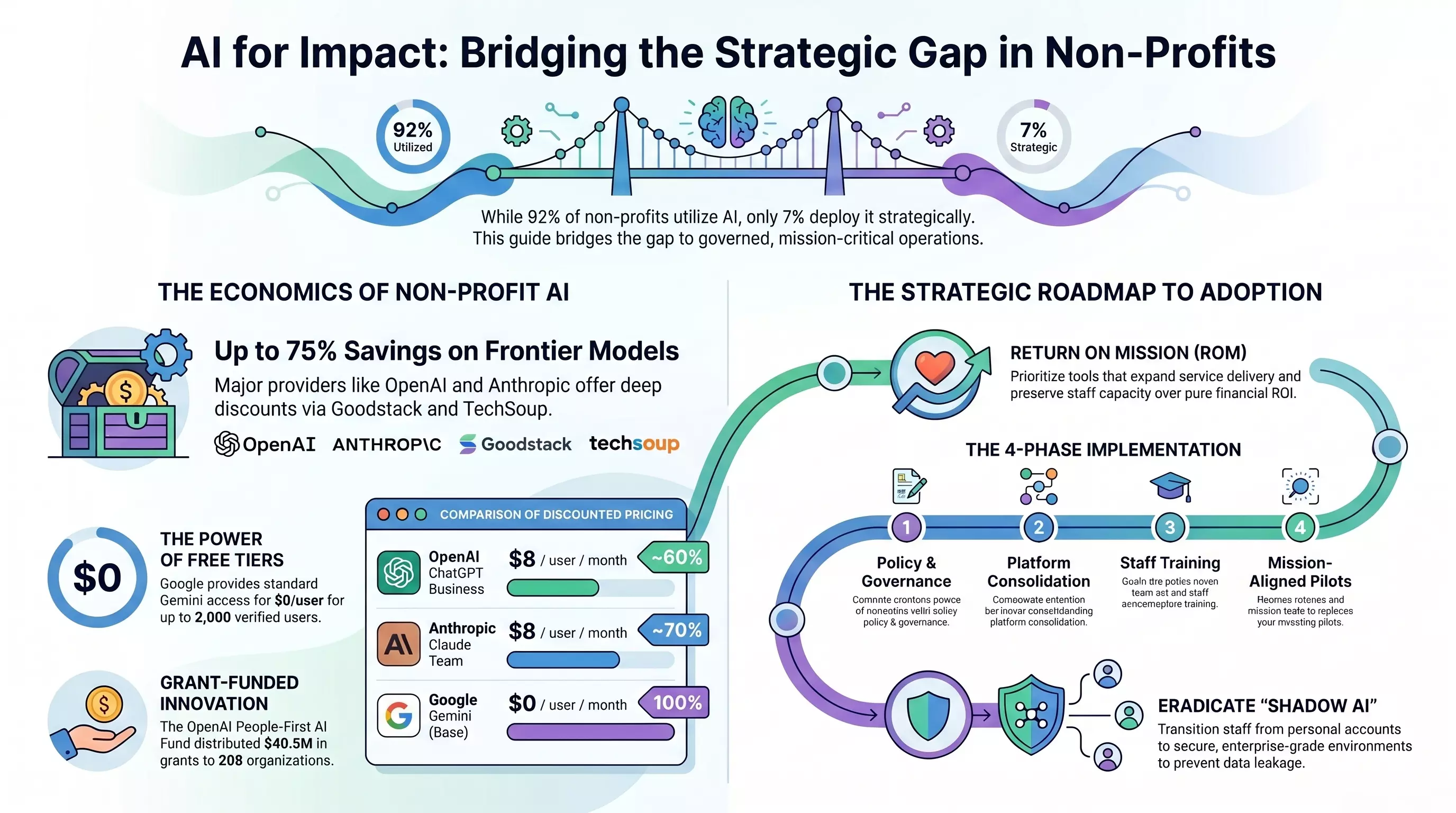
The pattern south of the border is the same shape with a sharper edge. The 2026 Nonprofit AI Adoption Report surveyed 346 U.S. organizations and found that ninety-two percent use AI — but only seven percent describe their deployment as strategic, meaning they can point to a clear ROI or measurable mission impact. Sixty-five percent characterize their AI use as “reactive and individual,” typically running on personal ChatGPT accounts with no centralized coordination. Forty-seven percent have no formal AI policy at all.
This is the gap that matters. The cost of entry collapsed years ago. Nonprofit-specific pricing is now sitting at $0–$8 per user per month for the major frontier models. The bottleneck is no longer “can we afford it.” It is whether anyone has decided what “it” is supposed to do, who is allowed to use it, on what data, with what review process, against what success metric. The rest of this post is about closing that gap — concretely, with the actual numbers, the actual verification steps, and the gotchas the pricing pages don’t mention.
The Pricing Tiers, Decoded — and the Verification Path Nobody Documents Clearly
Before getting to strategy, it’s worth being precise about what each major vendor’s nonprofit program actually costs and what you have to do to qualify. The headline discounts are real, but the operational details are where small organizations stall.
OpenAI ChatGPT Business for Nonprofits is $8 per user per month on an annual commitment, or $10 monthly — down from $20–$25 commercial. That’s roughly a 60% discount. The catch is the verification path: you go through Goodstack, not directly through OpenAI’s billing portal. Goodstack accepts Canadian charity registration (your CRA charitable registration number and BN), along with a mission statement; U.S. entities submit their IRS 501(c)(3) determination letter and EIN. Academic institutions, religious organizations, and government agencies are explicitly excluded. Above twenty seats, you exit the self-serve flow and negotiate directly with OpenAI sales for Enterprise pricing, which is reported to reach up to 75% off.
Anthropic Claude for Nonprofits is structurally similar: $8 per user per month for the standard Team plan (two-seat minimum, up to 150 seats), or $40 per user per month for the Premium Team plan with substantially higher token limits. Verification is also through Goodstack. The differentiator is built-in connectors: Anthropic’s nonprofit announcement calls out dedicated integrations with Benevity, Blackbaud, and Candid, which let staff query donor metrics or research foundation grants from inside Claude rather than copy-pasting data — a meaningful security improvement over the default “paste the donor list into a chat window” pattern.
| Plan | Commercial Rate | Nonprofit Rate | Discount | Seat Range | Verification |
|---|---|---|---|---|---|
| ChatGPT Business | $20–25/user/mo | $8/user/mo (annual) | ~60% | Up to 20 (self-serve) | Goodstack |
| ChatGPT Enterprise | Custom | Up to 75% off | Up to 75% | 20+ seats | OpenAI Sales |
| Claude Team (Standard) | $25–30/user/mo | $8/user/mo | ~70% | 2–150 | Goodstack |
| Claude Team (Premium) | $45–50/user/mo | $40/user/mo | ~15–20% | 2–150 | Goodstack |
| Claude Enterprise | Custom | Up to 75% off | Up to 75% | Custom | Anthropic Sales |
Microsoft 365 Copilot is where the math gets less obvious. The nonprofit discount on the Copilot add-on is only 15% — $25.50 per user per month billed annually, versus $30 commercial. Where Microsoft makes the program economically interesting is the base license: Microsoft 365 Business Premium is discounted to $5.50 per user per month, and nonprofits get up to ten Business Premium seats free as a software grant. There is a TechSoup promotion running through June 30, 2026 offering Copilot Business at $18 per user per month, capped at 300 seats.
The Microsoft program also carries a compliance string that catches people off guard: an 85% active usage mandate. To maintain free or deeply discounted cloud licenses, the organization has to keep at least 85% of users actively engaging with at least one Microsoft 365 cloud service inside a rolling 90-day window. Miss the threshold and the software grant can be revoked, which means IT administrators have to either drive adoption or proactively shed licenses for inactive users. For a small nonprofit with seasonal volunteers on the tenant, this is a real operational task, not a checkbox.
Google Gemini for Nonprofits is the simplest of the four: the standard Gemini app and NotebookLM are free for any organization on the Google for Nonprofits Workspace base plan, with enterprise-grade data protection covering HIPAA, GDPR, and SOC. New accounts can add up to 300 users immediately; the cap goes up to 2,000 users with an admin-console request. For deeper integration of Gemini 2.5 Pro and Flash directly inside Docs, Sheets, Slides, and Gmail, Google offers up to 75% off advanced Workspace editions — Business Standard at $3.50 per user per month and Business Plus at $6.16, on annual commitments.
| Plan | Commercial | Nonprofit | Discount | Key Constraint |
|---|---|---|---|---|
| Microsoft 365 Copilot | $30/user/mo | $25.50/user/mo (annual) | 15% | Requires compatible M365 base license |
| Microsoft 365 Copilot Business (TechSoup promo) | $21/user/mo | $18/user/mo | ~15% | Promo through Jun 30, 2026; 300-seat cap |
| Microsoft 365 Business Premium (base) | $22/user/mo | $5.50/user/mo | ~75% | First 10 seats free as software grant |
| Google Gemini (standard) + NotebookLM | Add-on pricing | $0/user/mo | 100% | Google for Nonprofits Workspace; up to 2,000 users |
| Google Workspace Business Standard | Standard add-on rate | $3.50/user/mo | Up to 75% | Annual commitment |
| Google Workspace Business Plus | Standard add-on rate | $6.16/user/mo | Up to 75% | Annual commitment |
The infrastructure layer is also worth knowing about. AWS offers tiered credit grants through TechSoup Plus: $1,000 for organizations under $10M in operating budget (admin fee $47), $2,000 for $10–50M ($95), and $5,000 for over $50M ($237). These are 12-month promotional credits, which is enough to run a database or host a custom internal AI tool for a year, but not enough to underwrite a production workload — plan accordingly. Adjacent to the AI tools themselves, there are several CRM, volunteer-management, and productivity programs worth a line item in the planning spreadsheet:
| Program | Discount | Eligibility | Admin Fee |
|---|---|---|---|
| AWS Credits (Small) | $1,000 / 12 months | <$10M budget | $47 |
| AWS Credits (Medium) | $2,000 / 12 months | $10–50M budget | $95 |
| AWS Credits (Large) | $5,000 / 12 months | >$50M budget | $237 |
| Salesforce Agentforce / Volunteers | First 10 EE licenses free; up to 80% off additional | Global, verified charities | $0 |
| Sumac Case Management | 100% off licenses | <$2M CAD budget | $0 |
| Civic Champs | 50% off standard subscriptions | <$1M USD budget | Custom |
| Zelos Volunteer Management | 40% off ($712 vs $1,188/year) | Global, verified charities | $0 |
| Grammarly for Nonprofits | 30% off Pro plans | Global, verified charities | Custom |
OpenAI also operates a direct grant program, though Canadian charities should note the eligibility constraint up front. The People-First AI Fund — a $50M commitment announced in July 2025 — had received roughly 3,000 applications by its October 2025 deadline and distributed $40.5M in unrestricted grants to 208 U.S. nonprofits by year-end, with an average grant size around $195,000. Eligibility required a $500K–$10M annual operating budget, primarily U.S.-focused operations, and independence from a larger parent institution. Canadian organizations are not eligible for this fund as currently scoped. The closest Canadian equivalent in the funding-and-capacity-building stack is the Microsoft Elevate partnership with Imagine Canada and CCNDR, plus the bilingual Nonprofit AI Impact Hub, which is more about capacity-building resources than direct cash grants.
Why “Got the Discount” Is Not the Same as “Has a Program”
This is the place the pricing-comparison blog posts stop and where the actual work begins. Securing the $8/user license solves the procurement question. It does not solve any of the questions a board should be asking before the seats are deployed.
The most immediate of those is donor sensitivity, and it is the single most under-discussed risk in the sector. A 2026 Bloomerang survey found that while 43.3% of donors believe AI use has a positive or neutral effect on their giving, 31.4% say that knowing a charity uses AI makes them less likely to donate. The split is sharper by donor tier: 30% of major donors support AI integration, against 19% of mid-level donors and only 13% of small donors. The strategic implication is that the donors most likely to fund your transformation are more comfortable with AI, but the broad base that sustains the operating budget is more skeptical. Authenticity disclosures and a clearly governed program move differently with each segment, and an unmanaged “we automated all the appeals” posture risks the base while delighting the major-gift pipeline.
The second risk is Shadow AI — staff pasting sensitive donor records, beneficiary case notes, or program data into personal ChatGPT accounts because there is no sanctioned alternative. Public models often train on inputs by default, which makes copy-paste the leading vector for unauthorized data leakage in modern organizations. For a nonprofit handling protected health information under HIPAA, or any personal data of EU subjects under GDPR, that single copy-paste can produce a reportable breach. The fix is structural: ban personal AI accounts on organizational devices and provide the secure enterprise alternative before the policy, not after.
Third is copyright and authorship. The U.S. Copyright Office and federal courts continue to hold that purely AI-generated material, created without meaningful human authorship, cannot be copyrighted. For a nonprofit producing curriculum, research, or advocacy resources, that is a direct IP exposure: a fully AI-drafted toolkit is, in practical terms, in the public domain. The mitigation is policy that explicitly requires substantial human authorship on any work product the organization expects to control.
Fourth is hallucination and bias. The Bloomerang report cites an approximate 15% hallucination rate across generative models — a useful order-of-magnitude figure, with the honest caveat that hallucination rates vary widely by task, model, and prompt design, and a number that high is closer to a worst case for ungrounded factual queries than a universal constant. The point holds either way: any AI output that touches a beneficiary, a legal claim, a medical instruction, or a public statement requires human review, and that review process needs to be a written step in someone’s workflow, not an aspiration.
Return on Mission: The Metric Replacement
For-profit AI deployments are evaluated on ROI. Nonprofits that try to import that frame directly tend to end up measuring the wrong things — cost per output, tokens per dollar, hours saved — without ever asking whether the work the AI sped up was the work the mission actually needed.
Attain Partners’ ROM (Return on Mission) framework is a more honest fit. ROM measures how effectively a technology investment expands service delivery, preserves staff capacity, and aligns with the organization’s core values. The framework rests on four principles that are worth treating as gates, not suggestions:
- Start conversations with the mission, not the tool. Identify a specific community need or operational bottleneck first, then ask whether AI is the right intervention. Reverse the order and you’ll deploy software in search of a problem.
- Predefine what success and failure look like. Write down the metric and the threshold before the pilot starts. This is the discipline that prevents sunk-cost rationalization six months in.
- Evaluate against mission contribution, not pure financial return. A tool that saves $40K but degrades the donor relationship has a negative ROM even if its ROI is positive.
- Enforce hard exit strategies. If a pilot isn’t tracking toward mission impact, kill it. The “we already paid for the seats” reflex is how organizations end up with three years of unused Copilot licenses.
The case-study evidence for what a disciplined deployment actually produces is sturdier than the hype suggests. The pattern across the published results is consistent: every win comes from a program with a defined mission question and a measurable target, not from “let’s deploy ChatGPT and see what happens.”
| Organization | AI Application | Reported Outcome |
|---|---|---|
| UPMC Health System | Predictive donor profiling & timing models | 99% donor response rate increase (1-day rollout) |
| New donor acquisition campaign | Propensity modeling & micro-targeting | 7% reduction in donor acquisition costs |
| High card affinity campaign | Direct-mail theme modeling | 7% response lift, 9% net revenue increase |
| Currency non-responders campaign | Mail-frequency & reactivation scoring | 25% fewer mailings, 6.7% net revenue increase |
| Commercial Bank of Dubai | AI literacy + workflow integration | 39,000 admin hours saved annually |
| Acentra Health (MedScribe) | Clinical narrative generation | 11,000 nursing hours saved; $800K annual labor savings; 99% accuracy |
| Dairy Farmers of America | Microsoft 365 Copilot automation | Up to 20 hours/employee/month saved |
| Oxford University Hospitals | Microsoft 365 Copilot reports | 1–2 hours/staff/week saved on reports |
Note the consistency: the most striking returns are in the upper rows — predictive donor profiling and propensity modeling — where AI is making targeting decisions, not generating content. The lower rows — Copilot deployments saving hours per employee — are the more common pattern most nonprofits will land in: meaningful but incremental, valuable in aggregate. Both are real. Mistaking the second for the first (or vice versa) is how organizations end up with mis-set expectations at board meetings.
The Canadian Compliance Layer
For Canadian charities and nonprofits, AI governance does not sit on a blank canvas. Several pre-existing regulatory regimes already dictate how donor data, beneficiary records, and board materials must be stored, secured, and retained — and the moment AI tools touch that data, those regimes apply to the AI deployment by default. The implication is that the AI policy from Phase 1 below is not a standalone document; it has to reconcile with the controls already imposed by the CRA, federal privacy law, and provincial governance statutes.
| Dimension | Authority | Core Requirement | IT / AI Configuration Implication | Retention |
|---|---|---|---|---|
| CRA T3010 Charity Information Return | Canada Revenue Agency | File within 6 months of fiscal year-end; maintain comprehensive books and records | Cloud platforms must securely store receipt registers, donor lists, board minutes with verifiable retention policy | Minimum 6 years from end of fiscal year |
| PIPEDA Privacy Standards | Office of the Privacy Commissioner of Canada | Strict protection of donor and beneficiary PII; mandatory breach reporting | All personal data and backups must reside in Canadian-region cloud tenants (e.g., Azure Canada, Google Workspace Canada region) | Ongoing security and breach incident logs |
| ONCA Governance Mandate | Ontario Ministry of Public and Business Service Delivery | Formal board governance, member-data protection, audit logs | Secure member databases; ED and Treasurer carry personal civil liability for compliance failures | Ongoing verifiable audit trails |
| Ontario Bill 194 (O. Reg. 51/26) | Ontario Ministry of Red Tape Reduction | Strict cybersecurity and incident response rules | Applies only to named “prescribed entities” (e.g., Children’s Aid Societies) — not all Ontario nonprofits | Per provincial regulatory guidelines |
| Cyber Insurance Baseline Controls | Canadian insurance underwriters | Mandatory MFA, endpoint detection (EDR), immutable offsite backups | Verifiable evidence of active MFA, secure endpoints, tested backup restoration; required for most renewals | Regular verification of IR and BCP |
The two rows that catch most nonprofit leaders off guard are PIPEDA’s data-residency expectation and ONCA’s personal-liability clause. The PIPEDA implication is concrete: when you stand up Microsoft 365 or Google Workspace as your AI-enabled tenant, the tenant has to be provisioned in a Canadian datacenter region. This is a default that has to be set at creation time on Microsoft and is configurable on Google; getting it wrong means migrating later, which is painful and expensive. The ONCA implication is governance: under the Ontario Not-for-Profit Corporations Act, the Executive Director and Treasurer carry personal civil liability for member-data governance failures. That converts AI policy from a “nice to have” into a fiduciary obligation for the board.
Quebec organizations layer an additional regime on top: Quebec’s Law 25 (the Act to modernize legislative provisions as regards the protection of personal information) imposes its own consent, breach-notification, and privacy-by-design requirements that go beyond PIPEDA in several places. If you operate in or have members in Quebec, the AI policy needs an explicit Law 25 alignment section, not just a PIPEDA one.
One last note on Bill 194: a lot of Ontario nonprofit IT guidance has conflated this with a sector-wide cybersecurity mandate. It isn’t. Bill 194 and O. Reg. 51/26 apply only to specifically named “prescribed entities” — most of which are public-sector or quasi-public-sector organizations like Children’s Aid Societies. A typical registered charity is not a prescribed entity. Treat the cyber-insurance baseline controls (MFA, EDR, immutable backups) as the practical floor instead — those are effectively mandatory for renewal at most Canadian underwriters, and they happen to be the same controls Bill 194 would require if it did apply.
A Four-Phase Path from Ad-Hoc to Strategic
The path from shadow-ChatGPT chaos to the strategic 7% is short and surprisingly well-documented. The phases are sequential — skip ahead and the later phases collapse.
Phase 1 — Policy and governance. Before any tool is deployed, the board adopts a written AI Usage Policy: approved platforms, explicit ban on entering sensitive donor or beneficiary PII into public models, required human authorship on any work product the organization wants to copyright, mandatory human review of any AI output that touches a beneficiary or public statement, and a clear escalation path for incidents. The policy needs explicit reconciliation with the Canadian compliance layer described above — PIPEDA data residency, CRA T3010 retention, ONCA member-data governance, and (where applicable) Quebec’s Law 25. The document itself is short — two to four pages is plenty — and lives where staff can find it. Board sign-off is the gate to Phase 2.
Phase 2 — Platform consolidation and verification. Migrate staff off personal accounts onto verified enterprise tenants. Run the Goodstack or TechSoup Canada verification, claim the discounted seats, and configure the tenant correctly. Two non-negotiables for Canadian deployments: provision the Microsoft 365 or Google Workspace tenant in a Canadian datacenter region at creation (Azure Canada Central / East or Google’s Canadian region) so personal data does not cross the border by default, and configure six-year retention on document libraries and email so the CRA T3010 record-keeping requirement is satisfied automatically rather than by hand at audit time. Microsoft’s nonprofit program in Canada also entitles eligible organizations to ten free Microsoft 365 Business Premium seats, which is usually the most cost-effective base license to pair with Copilot.
Phase 3 — Staff capacity and training. A platform with no fluency is just a more expensive version of the personal-ChatGPT problem. The free options here are good enough that there’s no excuse: Anthropic’s AI Fluency for Nonprofits (free, non-technical, developed with GivingTuesday), TechSoup’s Exploring AI with Microsoft Tools track, and the Canadian Centre for Nonprofit Digital Resilience’s Nonprofit AI Impact Hub. Budget an hour per staff member per quarter; that alone moves the needle.
Phase 4 — Structured, mission-aligned pilots. Pick one operational bottleneck, define the ROM metric, set a 60- or 90-day evaluation window, and ship. Good first pilots are bounded and low-risk: using Claude’s Blackbaud connector for donor segmentation, drafting first-pass grant narratives with a templated prompt library, or automating the volunteer-scheduling email flow. Bad first pilots try to automate the donor relationship itself.
Where the Evidence Is Still Thin
A few claims in this space deserve honest caveats rather than confident citation.
The 15% hallucination figure is a useful planning number, but model and task variance is large enough that any organization deploying AI in regulated contexts should run their own grounded-vs-ungrounded error measurement, not rely on a sector-wide average. The donor-sensitivity data is drawn from a single survey vendor — directionally credible, worth replicating against your own donor base before making strategy from it. The Microsoft 85% active-usage rule is widely reported in nonprofit IT guidance but is enforced unevenly; treat it as a real risk worth monitoring, not as a deterministic trigger. And the case-study numbers above come from vendor-published material, which means they describe what is achievable under favorable conditions, not what is typical.
None of those caveats undermine the central point. The cost of entry to capable AI is now negligible for verified nonprofits. The differentiator from here on out is whether the program is governed, measured, and tied to a mission outcome — or whether the organization has, in effect, paid $8 per seat per month for a permanent permission slip to keep doing what it was already doing.
Closing
The strategic deficit in nonprofit AI is not a money problem and it is not a technology problem. It is a decision problem — the decision to write the policy, run the verification, train the staff, and pick the first pilot. Every one of those steps has been documented, discounted, and de-risked by the major vendors and the sector’s training bodies. The seven percent of organizations that are getting real ROM did not have unusual budgets or unusual technical talent. They had a board that decided.
If you’re leading a nonprofit and you can’t currently answer “what AI tools are sanctioned here, on what data, reviewed by whom, against what metric,” you are running on the same default that the other eighty-five percent are running on. The good news is that this is one of the cheapest gaps to close in modern nonprofit operations. The first phase is a document. The rest follows.